Saturday, May 20, 2023

Mastering Angular Reactive Forms: Part 1 - Building Dynamic and Interactive Forms

 #AngularReactiveForms #AngularForms #ReactiveFormsTutorial #AngularTutorial #AngularFormsPart1 #AngularFormValidation #AngularFormSubmissions #DynamicForms #InteractiveForms #AngularDevelopment #FrontendDevelopment #WebDevelopment


https://youtu.be/EpdRLNpm3F0


<iframe width="560" height="315" src="https://www.youtube.com/embed/EpdRLNpm3F0" frameborder="0" allow="accelerometer; autoplay; clipboard-write; encrypted-media; gyroscope; picture-in-picture" allowfullscreen></iframe>

Wednesday, May 3, 2023

EXCEPTION HANDLING IN SQL ?

Select *from EMPLOYEES


--CREATE TABLE TEST

--(

--   ID INT,

--   [NAME] NVARCHAR(10)

--)


SELECT ID,[NAME] FROM TEST

INSERT INTO TEST([NAME],ID) VALUES('SHYAM',88)

--Using Distinct Keyword to select Unique records

SELECT DISTINCT ID,[NAME] FROM TEST

--select records using where clause

SELECT ID,[NAME] FROM TEST WHERE ID=20

--select records using where AND/OR Clause

SELECT ID,[NAME] FROM TEST WHERE ID=20 AND [NAME]='RAM' OR [NAME]='SHYAM'

--select records using where IN Clause

SELECT ID,[NAME] FROM TEST WHERE [NAME] IN ('RAM','SHYAM')

--select records using where BETWEEN Clause

SELECT ID,[NAME] FROM TEST WHERE ID BETWEEN 55 AND 99

--select records using where LIKE Clause

SELECT ID,[NAME] FROM TEST WHERE [NAME] LIKE '%YAM%'

--select records using Order BY Clause

SELECT ID,[NAME] FROM TEST ORDER BY 2 DESC

--select records using Group BY Clause

SELECT SUM(ID) ID,[NAME] FROM TEST GROUP BY [NAME]

--select records using Count Clause

SELECT COUNT(ID) ID FROM TEST

--select records using MAX Clause

SELECT MAX(ID) ID FROM TEST

--select records using Having Clause

SELECT ID FROM TEST GROUP BY ID HAVING MAX(ID)>20


CREATE INDEX INDEX_TEST_ID

ON TEST(ID)


ALTER TABLE TEST

DROP INDEX INDEX_TEST_ID ON TEST  --- DROP INDEX FROM TABLE


--------EXCEPTION HANDLING-----------


 BEGIN TRY


SELECT *FROM TEST


DECLARE @A INT = 1;

DECLARE @B INT = 0;

DECLARE @C INT = 0;

SET @C = @A/@B;


END TRY

BEGIN CATCH


PRINT 'CATCH'


END CATCH

Tuesday, May 2, 2023

SQL Statements?

 --SELECT,INSERT,UPDATE,DELETE,ALTER,DROP,TRUNCATE,CREATE,USE,SHOW


--USE [LiveSession]

--SELECT *FROM EMPLOYEES

--SELECT *FROM EMPLOYEESALARY

--INSERT INTO EMPLOYEES([NAME],ID,IsActive,AGE) VALUES('HELLO',5,0,60)

--UPDATE EMPLOYEES SET [NAME] = 'ABC',AGE=1 WHERE ID=5

--DELETE EMPLOYEES WHERE ID=5


--DELETE EMPLOYEESALARY


--ALTER TABLE EMPLOYEESALARY ADD T INT

--ALTER TABLE EMPLOYEESALARY ALTER COLUMN T BIT  -- ALT+F1


--TRUNCATE VS DROP VS DELETE


TRUNCATE TABLE EMPLOYEESALARY -- IDENTITY(1,1)


DROP TABLE EMPLOYEESALARY


Friday, April 28, 2023

Sql Constraints? #sql

 1. DEFAULT Constraint: Provides a default value for a column when none is specified.

2. UNIQUE Constraint: Ensures that all the values in a column are different.

3. PRIMARY Key: Uniquely identifies each row/record in a database table.

4. FOREIGN Key: Uniquely identifies a row/record in any another database table.

5. CHECK Constraint: The CHECK constraint ensures that all values in a column satisfy

certain conditions.

6. INDEX: Used to create and retrieve data from the database very quickly.

7. NOT NULL Constraint: Ensures that a column cannot have a NULL value.


CREATE TABLE EMPLOYEES

(

   [Name] VARCHAR(50) PRIMARY KEY,

   ID INT NOT NULL,

   IsActive BIT DEFAULT(1),

   AGE INT UNIQUE

)


SELECT ID,IsActive,AGE,[Name] FROM EMPLOYEES


INSERT INTO EMPLOYEES(ID,[Name],AGE) VALUES(1,'Mohit17',40)


INSERT INTO EMPLOYEESALARY(SALARY,NAME_PR) VALUES(100000,'Mohit1722')


Select *from EMPLOYEESALARY


--CREATE TABLE EMPLOYEESALARY

--(

--    SALARY INT NOT NULL,

-- NAME_PR VARCHAR(50) FOREIGN KEY REFERENCES EMPLOYEES([Name])

--)


CREATE TABLE EmployeeAddress

(

    AGE INT NOT NULL CHECK(AGE >=18)

)


SELECT *from EmployeeAddress


INSERT INTO EmployeeAddress(AGE) VALUES(18)


CREATE INDEX INDEX_AGE

ON EmployeeAddress(AGE)

What is An Assembly ? #assembly #csharp

 An Assembly is a basic building block of .Net Framework applications. It is basically a compiled code that can be executed by the CLR. An assembly is a collection of types and resources that are built to work together and form a logical unit of functionality. An Assembly can be a DLL or exe depending upon the project that we choose.

 
Assemblies are basically the following two types:
  1. Private Assembly
  2. Shared Assembly
1. Private Assembly
 
It is an assembly that is being used by a single application only. Suppose we have a project in which we refer to a DLL so when we build that project that DLL will be copied to the bin folder of our project. That DLL becomes a private assembly within our project. Generally, the DLLs that are meant for a specific project are private assemblies.
 
2. Shared Assembly
 
Assemblies that can be used in more than one project are known to be a shared assembly. Shared assemblies are generally installed in the GAC. Assemblies that are installed in the GAC are made available to all the .Net applications on that machine.
 
However, there are two more types of assemblies in .Net, Satellite Assembly, and Shared Assembly.
 
GAC
 
GAC stands for Global Assembly Cache. It is a memory that is used to store the assemblies that are meant to be used by various applications.
 
Every computer that has CLR installed must have a GAC. GAC is a location that can be seen at “C:\Windows\assembly” for .Net applications with frameworks up to 3.5. For higher frameworks like 4 and 4.5 the GAC can be seen at:
 
“C:\Windows\Microsoft.NET\assembly\GAC_MSIL”.
 
Installing an assembly into the GAC
 
For installing an assembly into the GAC we first need to generate strong names for the assembly because only a strong name assembly is installed in the GAC. All other assemblies are known as weak named assemblies and they cannot be stored in the GAC.
 
For generating a strong name assembly we first create a console application type project. In that solution, we will add one more project (Class Library).
 
Class Library
 
In the Class Library project, I created a class Student that contains a method that returns a string. Now I will add a reference of the Class Library to my Console application project and will use this method.
 
If we see the bin folder of our Console Application project then we will see that the ClassLibrary DLL is present there (It will come when we build our project). This DLL is a Private Assembly now.
 
Console application project
 
Generating Strong Name
 
To make our assembly strongly named we need to generate a unique key-value pair, for that we need to open the Visual Studio command prompt. We can open that from the Start button by going to "All programs" -> "Visual Studio 2012" (or any version that you have)  -> "Visual Studio Tools" -> "Developer Command Prompt for Visual Studio" and run that as an administrator.
 
Command Prompt
 
Then type the command sn –k “Path where you want that key to be generated”
 
command
 
This will generate the unique key pair that we will use in our application.
 
Now move to the Visual Studio Class Library Project and open the AssemblyInfo.cs file that is residing in the Properties folder of your project. In the bottom of that file add a new attribute that refers to the key pair file that we have just created.
 
[assembly: AssemblyKeyFile("D:\\strongname.snk")] 
 
attribute
 
Now build your Class Library project and ensure it builds successfully. If it builds then it means that your ClassLibrary DLL has become strongly typed. If you want to check that then open the Visual Studio command prompt, copy the path of the "bin.Debug" folder of your ClassLibrary project. Now paste the path into the command prompt with the cd command (refer to the following screenshot). Now type the command sn –T “ClassLibrary.dll”. After typing this command you will get a public key token that indicates that your assembly is Strongly Named and it is ready to install in the GAC.
 
install in GAC
 
Now to install the assembly in the cache type the following command in the command prompt:
 
gacutil –i "Name of the Class Library"
 
install assembly in cache
 
Now the Assembly is successfully installed on the system. If you want to see that you can see that in the location “C:\Windows\Microsoft.NET\assembly\GAC_MSIL”.
 
Note: If you are using the framework greater than 4.0 then you can search the preceding given path but if you are using a framework lesser than 4.0 then your assembly will be installed at “C:\Windows\assembly”.
 
installed


Thursday, April 27, 2023

Types of inheritance in Entity Framework #TPH # TPT #TPC #ENTITY #ENTITYFRAMEWORK

 #TPH # TPT #TPC #ENTITY #ENTITYFRAMEWORK

  1. Table-per-Hierarchy (TPH)

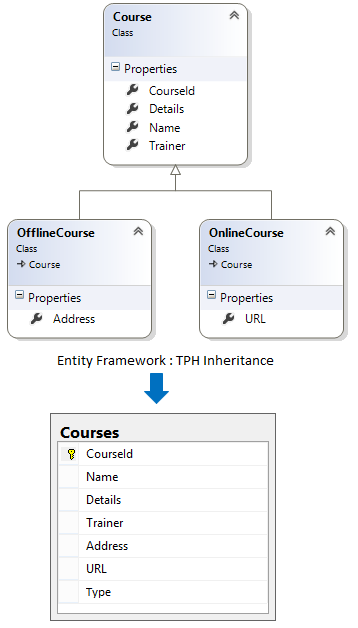
    The TPH inheritance states that all entities, in a hierarchy of entities, are mapped to a single table in storage schema. It means, there is only one table in database and different Entity types in Entity model that inherits from a base Entity are mapped to that table.

    Table-per-Hierarchy (TPH)

    C# Implementation Code for TPH

     public class Course
     {
     [Key]
     public int CourseId { get; set; }
     public string Name { get; set; }
     public string Details { get; set; }
     public string Trainer { get; set; }
     }
    
     public class OnlineCourse : Course
     {
     public string URL { get; set; }
     }
    
     public class OfflineCourse : Course
     {
     public string Address { get; set; }
     }
    

    Entity Framework Code First Mapping for TPH

    modelBuilder.Entity<Course>()
     .Map<OnlineCourse >(m => m.Requires("Type").HasValue("OnlineCourse "))
     .Map<OfflineCourse >(m => m.Requires("Type").HasValue("OfflineCourse "));


  2. Table-per-Concrete-Type (TPC)

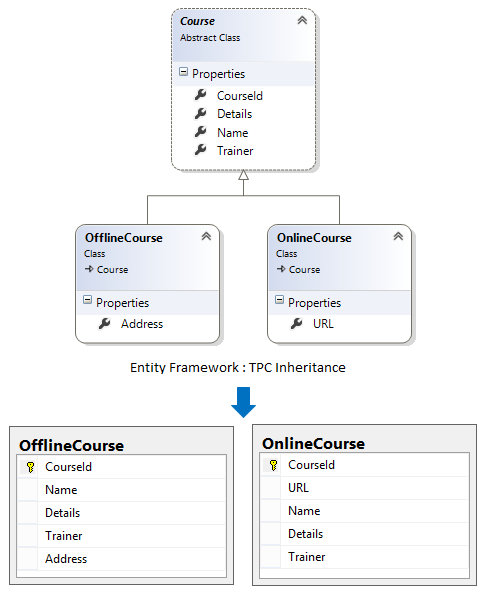
    The TPC inheritance states that each concrete class (a class which can be instantiated) in the hierarchy of entities is mapped to a separate table in storage schema. It means, there is separate table in database to maintain data for each derived entity type.

    Table-per-Concrete-Type (TPC)

    C# Implementation Code for TPC

     public abstract class Course //abstract class
     {
     [Key]
     public int CourseId { get; set; }
     public string Name { get; set; }
     public string Details { get; set; }
     public string Trainer { get; set; }
     }
    
     public class OnlineCourse : Course //concrete class
     {
     public string URL { get; set; }
     }
    
     public class OfflineCourse : Course //concrete class
     {
     public string Address { get; set; }
     }
    

    Entity Framework Code First Mapping for TPC

    modelBuilder.Entity<OnlineCourse >().Map(m =>
    {
     m.MapInheritedProperties();
     m.ToTable("OnlineCourse ");
    });
    
    modelBuilder.Entity<OfflineCourse >().Map(m =>
    {
     m.MapInheritedProperties();
     m.ToTable("OfflineCourse ");
    });
    

    Note

    The TPC inheritance is commonly used to inherit basic features.

  3. Table-per-Type (TPT)

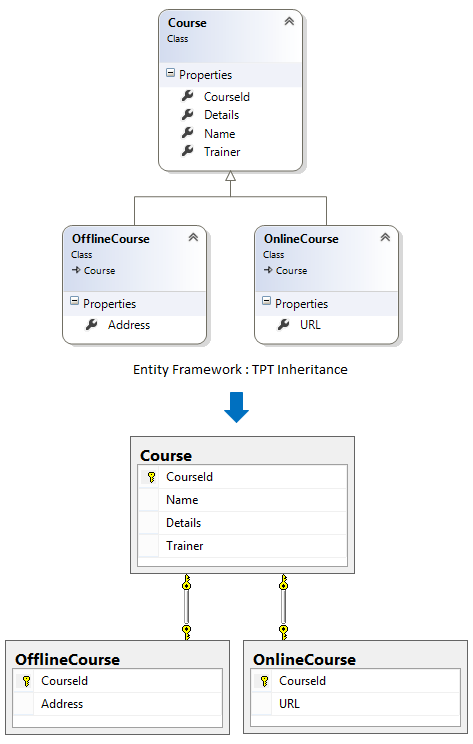
    The TPT inheritance states that each entity in the hierarchy of entities is mapped to a separate table in storage schema. It means, there is separate table in database to maintain data for each Entity Type.

    Table-per-Type (TPT)

    C# Implementation Code for TPT

     public class Course
     {
     [Key]
     public int CourseId { get; set; }
     public string Name { get; set; }
     public string Details { get; set; }
     public string Trainer { get; set; }
     }
    
     public class OnlineCourse : Course
     {
     public string URL { get; set; }
     }
    
     public class OfflineCourse : Course
     {
     public string Address { get; set; }
     }
    

    Entity Framework Code First Mapping for TPT

    modelBuilder.Entity<Course>().ToTable("Course");
    modelBuilder.Entity<OnlineCourse >().ToTable("OnlineCourse ");
    modelBuilder.Entity<OfflineCourse >().ToTable("OfflineCourse ");

Mastering Angular Reactive Forms: Part 1 - Building Dynamic and Interactive Forms

  #AngularReactiveForms #AngularForms #ReactiveFormsTutorial #AngularTutorial #AngularFormsPart1 #AngularFormValidation #AngularFormSu...